> For the complete documentation index, see [llms.txt](https://help.supplyd.co/llms.txt). Markdown versions of documentation pages are available by appending `.md` to page URLs; this page is available as [Markdown](https://help.supplyd.co/supplyd-erp/settings/locations/adding-locations.md).

# Adding Locations

Adding Locations helps you manage inventory, purchasing, deliveries & user access accurately for each business site.

Adding **Locations** in Supply’d allows you to configure the physical sites where your business operates. You can record the addresses and contact details, configure operational settings, add departments, and manage inventory, purchasing and user access separately for that site.

The address entered when you signed up for Supply’d is automatically created as your first location. Follow the instructions below to add another location or edit an existing one.

***

## Adding a Location&#x20;

{% stepper %}
{% step %}

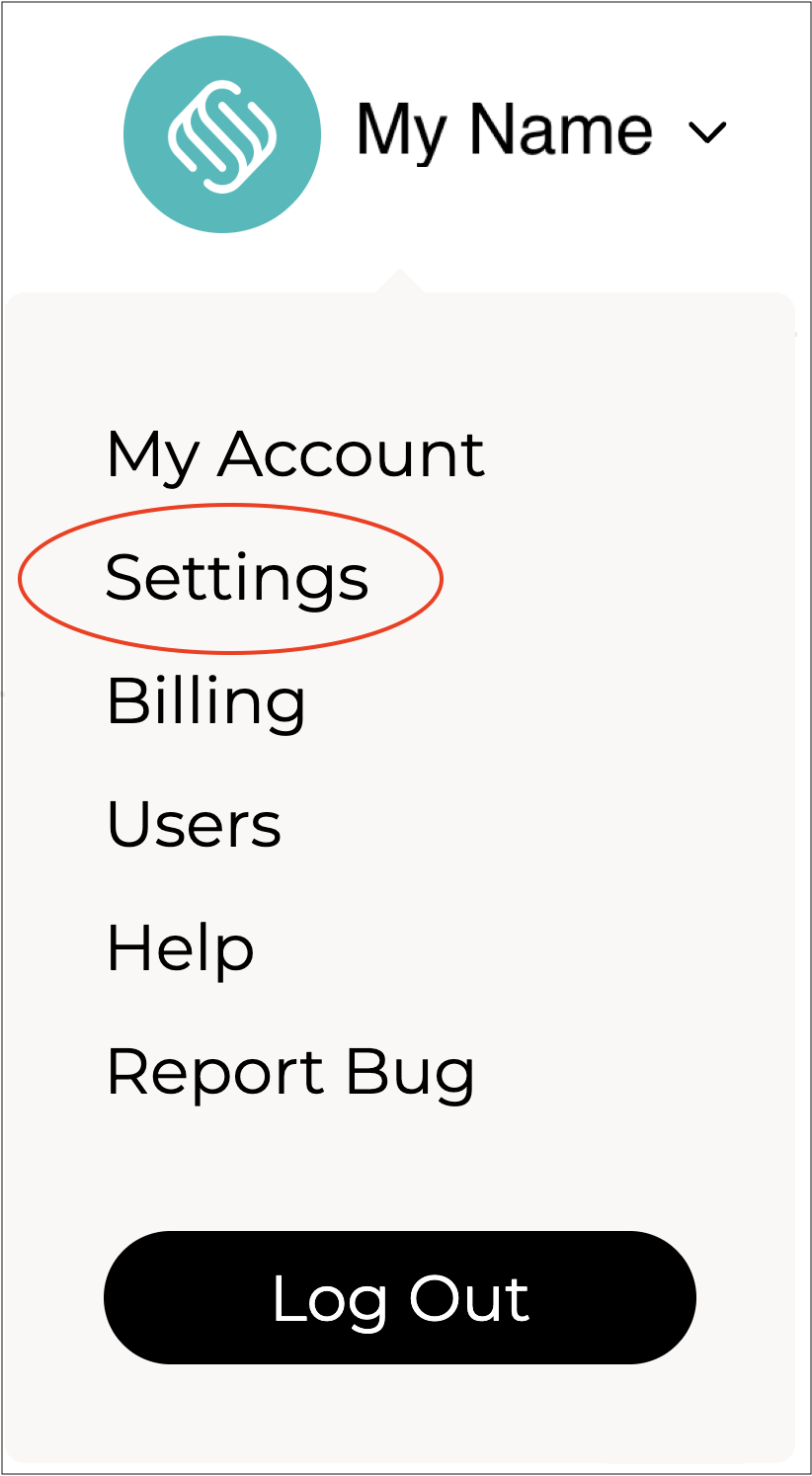
#### Go to the Settings Menu

Click on your name in the top right, then select **Settings** to open the **Settings** page.

<figure><img src="https://2965503026-files.gitbook.io/~/files/v0/b/gitbook-x-prod.appspot.com/o/spaces%2FDaPYJDB89ny0x7wcMedb%2Fuploads%2FbJDih3Dwv41QavjV1QDa%2FSpacer.png?alt=media&amp;token=6c34f805-9610-4de9-8f8a-a029f13dd1a1" alt=""><figcaption></figcaption></figure>

<img src="https://2965503026-files.gitbook.io/~/files/v0/b/gitbook-x-prod.appspot.com/o/spaces%2FDaPYJDB89ny0x7wcMedb%2Fuploads%2FF4PHp7MOvUhvNnGRFm3N%2FSettings.png?alt=media&amp;token=0f083361-b311-49f1-a026-aafde809130f" alt="" width="188">

<figure><img src="https://2965503026-files.gitbook.io/~/files/v0/b/gitbook-x-prod.appspot.com/o/spaces%2FDaPYJDB89ny0x7wcMedb%2Fuploads%2FZfdmX4NwTljIiVSRhIs6%2FSpacer.png?alt=media&amp;token=abde7c40-2c0c-4e05-afcb-a7e916640d9c" alt=""><figcaption></figcaption></figure>

***

{% endstep %}

{% step %}

#### Open the Locations Page

From the **Settings** menu, scroll down and select **Locations**.

<figure><img src="https://2965503026-files.gitbook.io/~/files/v0/b/gitbook-x-prod.appspot.com/o/spaces%2FDaPYJDB89ny0x7wcMedb%2Fuploads%2FbJDih3Dwv41QavjV1QDa%2FSpacer.png?alt=media&amp;token=6c34f805-9610-4de9-8f8a-a029f13dd1a1" alt=""><figcaption></figcaption></figure>

![](https://2965503026-files.gitbook.io/~/files/v0/b/gitbook-x-prod.appspot.com/o/spaces%2FDaPYJDB89ny0x7wcMedb%2Fuploads%2F3bEzTgkfP1Cdo5vb7TTu%2F2%20-%20Select%20Locations.png?alt=media\&token=449a1f51-1f25-433a-8da6-8cc4e840baeb)

<figure><img src="https://2965503026-files.gitbook.io/~/files/v0/b/gitbook-x-prod.appspot.com/o/spaces%2FDaPYJDB89ny0x7wcMedb%2Fuploads%2FbJDih3Dwv41QavjV1QDa%2FSpacer.png?alt=media&amp;token=6c34f805-9610-4de9-8f8a-a029f13dd1a1" alt=""><figcaption></figcaption></figure>

The **Locations** page will open.&#x20;

<figure><img src="https://2965503026-files.gitbook.io/~/files/v0/b/gitbook-x-prod.appspot.com/o/spaces%2FDaPYJDB89ny0x7wcMedb%2Fuploads%2FbJDih3Dwv41QavjV1QDa%2FSpacer.png?alt=media&amp;token=6c34f805-9610-4de9-8f8a-a029f13dd1a1" alt=""><figcaption></figcaption></figure>

<figure><img src="https://2965503026-files.gitbook.io/~/files/v0/b/gitbook-x-prod.appspot.com/o/spaces%2FDaPYJDB89ny0x7wcMedb%2Fuploads%2FR5Nz7k9sAEulz9yQe3hb%2FLocations%20Page.png?alt=media&amp;token=af4df049-5fac-4f2c-8c11-f7f3b798cae4" alt=""><figcaption></figcaption></figure>

<figure><img src="https://2965503026-files.gitbook.io/~/files/v0/b/gitbook-x-prod.appspot.com/o/spaces%2FDaPYJDB89ny0x7wcMedb%2Fuploads%2FbJDih3Dwv41QavjV1QDa%2FSpacer.png?alt=media&amp;token=6c34f805-9610-4de9-8f8a-a029f13dd1a1" alt=""><figcaption></figcaption></figure>

***

{% endstep %}

{% step %}

#### Click Add+

To add a new location click **Add+** in the top right corner of the **Locations** page.&#x20;

<figure><img src="https://2965503026-files.gitbook.io/~/files/v0/b/gitbook-x-prod.appspot.com/o/spaces%2FDaPYJDB89ny0x7wcMedb%2Fuploads%2FZfdmX4NwTljIiVSRhIs6%2FSpacer.png?alt=media&amp;token=abde7c40-2c0c-4e05-afcb-a7e916640d9c" alt=""><figcaption></figcaption></figure>

![](https://2965503026-files.gitbook.io/~/files/v0/b/gitbook-x-prod.appspot.com/o/spaces%2FDaPYJDB89ny0x7wcMedb%2Fuploads%2F4NpYhFYoo99IYKnYHI0c%2FClick%20Add%2B.png?alt=media\&token=6b070bb5-d649-45ca-9a92-738a7b959cd3)

<figure><img src="https://2965503026-files.gitbook.io/~/files/v0/b/gitbook-x-prod.appspot.com/o/spaces%2FDaPYJDB89ny0x7wcMedb%2Fuploads%2FZfdmX4NwTljIiVSRhIs6%2FSpacer.png?alt=media&amp;token=abde7c40-2c0c-4e05-afcb-a7e916640d9c" alt=""><figcaption></figcaption></figure>

The **Add Location** form will open.

<figure><img src="https://2965503026-files.gitbook.io/~/files/v0/b/gitbook-x-prod.appspot.com/o/spaces%2FDaPYJDB89ny0x7wcMedb%2Fuploads%2FZfdmX4NwTljIiVSRhIs6%2FSpacer.png?alt=media&amp;token=abde7c40-2c0c-4e05-afcb-a7e916640d9c" alt=""><figcaption></figcaption></figure>

<figure><img src="https://2965503026-files.gitbook.io/~/files/v0/b/gitbook-x-prod.appspot.com/o/spaces%2FDaPYJDB89ny0x7wcMedb%2Fuploads%2FSUCHDNZyMrUAwT8a3lwl%2F6%20-%20Add%20Location%20Form.png?alt=media&amp;token=d2bd3b0c-9f60-4c27-800f-311597e69c40" alt="" width="563"><figcaption></figcaption></figure>

<figure><img src="https://2965503026-files.gitbook.io/~/files/v0/b/gitbook-x-prod.appspot.com/o/spaces%2FDaPYJDB89ny0x7wcMedb%2Fuploads%2FZfdmX4NwTljIiVSRhIs6%2FSpacer.png?alt=media&amp;token=abde7c40-2c0c-4e05-afcb-a7e916640d9c" alt=""><figcaption></figcaption></figure>

{% hint style="success" %}
To open or close the sections on this form click the little arrows to the right of the titles (as circled in red above).
{% endhint %}

<figure><img src="https://2965503026-files.gitbook.io/~/files/v0/b/gitbook-x-prod.appspot.com/o/spaces%2FDaPYJDB89ny0x7wcMedb%2Fuploads%2FZfdmX4NwTljIiVSRhIs6%2FSpacer.png?alt=media&amp;token=abde7c40-2c0c-4e05-afcb-a7e916640d9c" alt=""><figcaption></figcaption></figure>

Complete the sections as per the guidelines below:

<figure><img src="https://2965503026-files.gitbook.io/~/files/v0/b/gitbook-x-prod.appspot.com/o/spaces%2FDaPYJDB89ny0x7wcMedb%2Fuploads%2FZfdmX4NwTljIiVSRhIs6%2FSpacer.png?alt=media&amp;token=abde7c40-2c0c-4e05-afcb-a7e916640d9c" alt=""><figcaption></figcaption></figure>

***

{% endstep %}

{% step %}

### Location Details

<figure><img src="https://2965503026-files.gitbook.io/~/files/v0/b/gitbook-x-prod.appspot.com/o/spaces%2FDaPYJDB89ny0x7wcMedb%2Fuploads%2FZfdmX4NwTljIiVSRhIs6%2FSpacer.png?alt=media&amp;token=abde7c40-2c0c-4e05-afcb-a7e916640d9c" alt=""><figcaption></figcaption></figure>

![](https://2965503026-files.gitbook.io/~/files/v0/b/gitbook-x-prod.appspot.com/o/spaces%2FDaPYJDB89ny0x7wcMedb%2Fuploads%2FKTyajHPaU6dhlhZTQwrf%2F7%20-%20Location%20Details.png?alt=media\&token=f33b6694-c8ea-4ecf-bc10-ec7aa31f7da7)

<figure><img src="https://2965503026-files.gitbook.io/~/files/v0/b/gitbook-x-prod.appspot.com/o/spaces%2FDaPYJDB89ny0x7wcMedb%2Fuploads%2FZfdmX4NwTljIiVSRhIs6%2FSpacer.png?alt=media&amp;token=abde7c40-2c0c-4e05-afcb-a7e916640d9c" alt=""><figcaption></figcaption></figure>

**Location Name\* \[required field]**

Enter a name for the location for internal reference. Often this would be the suburb that the store is located in.

<figure><img src="https://2965503026-files.gitbook.io/~/files/v0/b/gitbook-x-prod.appspot.com/o/spaces%2FDaPYJDB89ny0x7wcMedb%2Fuploads%2FZfdmX4NwTljIiVSRhIs6%2FSpacer.png?alt=media&amp;token=abde7c40-2c0c-4e05-afcb-a7e916640d9c" alt=""><figcaption></figcaption></figure>

**Location Type**

Select whether or not this address is used for billing and/or shipping. If you select "Shipping" only, the first billing location in your location list will be used as the billing address.&#x20;

<figure><img src="https://2965503026-files.gitbook.io/~/files/v0/b/gitbook-x-prod.appspot.com/o/spaces%2FDaPYJDB89ny0x7wcMedb%2Fuploads%2FZfdmX4NwTljIiVSRhIs6%2FSpacer.png?alt=media&amp;token=abde7c40-2c0c-4e05-afcb-a7e916640d9c" alt=""><figcaption></figcaption></figure>

**Address\*** **\[required field]**

Enter the street address of the location. This address should include any shop, unit, level and/or building numbers.

<figure><img src="https://2965503026-files.gitbook.io/~/files/v0/b/gitbook-x-prod.appspot.com/o/spaces%2FDaPYJDB89ny0x7wcMedb%2Fuploads%2FZfdmX4NwTljIiVSRhIs6%2FSpacer.png?alt=media&amp;token=abde7c40-2c0c-4e05-afcb-a7e916640d9c" alt=""><figcaption></figcaption></figure>

**Suburb\* \[required field]**&#x20;

Enter the suburb of the location.

<figure><img src="https://2965503026-files.gitbook.io/~/files/v0/b/gitbook-x-prod.appspot.com/o/spaces%2FDaPYJDB89ny0x7wcMedb%2Fuploads%2FZfdmX4NwTljIiVSRhIs6%2FSpacer.png?alt=media&amp;token=abde7c40-2c0c-4e05-afcb-a7e916640d9c" alt=""><figcaption></figcaption></figure>

**State/Province\* \[required field]**&#x20;

Enter the state of the location.

<figure><img src="https://2965503026-files.gitbook.io/~/files/v0/b/gitbook-x-prod.appspot.com/o/spaces%2FDaPYJDB89ny0x7wcMedb%2Fuploads%2FZfdmX4NwTljIiVSRhIs6%2FSpacer.png?alt=media&amp;token=abde7c40-2c0c-4e05-afcb-a7e916640d9c" alt=""><figcaption></figcaption></figure>

**Postcode\* \[required field]**&#x20;

Enter the postcode for the location.

<figure><img src="https://2965503026-files.gitbook.io/~/files/v0/b/gitbook-x-prod.appspot.com/o/spaces%2FDaPYJDB89ny0x7wcMedb%2Fuploads%2FZfdmX4NwTljIiVSRhIs6%2FSpacer.png?alt=media&amp;token=abde7c40-2c0c-4e05-afcb-a7e916640d9c" alt=""><figcaption></figcaption></figure>

**Country\* \[required field]**

Enter the country of the location.

<figure><img src="https://2965503026-files.gitbook.io/~/files/v0/b/gitbook-x-prod.appspot.com/o/spaces%2FDaPYJDB89ny0x7wcMedb%2Fuploads%2FZfdmX4NwTljIiVSRhIs6%2FSpacer.png?alt=media&amp;token=abde7c40-2c0c-4e05-afcb-a7e916640d9c" alt=""><figcaption></figcaption></figure>

***

{% endstep %}

{% step %}

### Operating Hours

Select the operating hours for this location when a delivery can be made. This is used to let your suppliers know when deliveries can be made to your premises.&#x20;

<figure><img src="https://2965503026-files.gitbook.io/~/files/v0/b/gitbook-x-prod.appspot.com/o/spaces%2FDaPYJDB89ny0x7wcMedb%2Fuploads%2FPihgtZaycODFmMbrFGhZ%2FSpacer.png?alt=media&amp;token=8505fb67-a722-441f-9670-a09069d4ce53" alt=""><figcaption></figcaption></figure>

{% hint style="info" %}
If not added, hours will default to 9am-5pm Mon-Fri.
{% endhint %}

<figure><img src="https://2965503026-files.gitbook.io/~/files/v0/b/gitbook-x-prod.appspot.com/o/spaces%2FDaPYJDB89ny0x7wcMedb%2Fuploads%2FZfdmX4NwTljIiVSRhIs6%2FSpacer.png?alt=media&amp;token=abde7c40-2c0c-4e05-afcb-a7e916640d9c" alt=""><figcaption></figcaption></figure>

<figure><img src="https://2965503026-files.gitbook.io/~/files/v0/b/gitbook-x-prod.appspot.com/o/spaces%2FDaPYJDB89ny0x7wcMedb%2Fuploads%2FajlZ8IikJrDcktXMx3e9%2F8%20-%20Operating%20Hours.png?alt=media&amp;token=33feb3c4-41a0-4e96-9cfb-43df02040a82" alt=""><figcaption></figcaption></figure>

<figure><img src="https://2965503026-files.gitbook.io/~/files/v0/b/gitbook-x-prod.appspot.com/o/spaces%2FDaPYJDB89ny0x7wcMedb%2Fuploads%2FZfdmX4NwTljIiVSRhIs6%2FSpacer.png?alt=media&amp;token=abde7c40-2c0c-4e05-afcb-a7e916640d9c" alt=""><figcaption></figcaption></figure>

***

{% endstep %}

{% step %}

### Location Settings&#x20;

The settings for this location.<br>

<figure><img src="https://2965503026-files.gitbook.io/~/files/v0/b/gitbook-x-prod.appspot.com/o/spaces%2FDaPYJDB89ny0x7wcMedb%2Fuploads%2FZfdmX4NwTljIiVSRhIs6%2FSpacer.png?alt=media&amp;token=abde7c40-2c0c-4e05-afcb-a7e916640d9c" alt=""><figcaption></figcaption></figure>

<figure><img src="https://2965503026-files.gitbook.io/~/files/v0/b/gitbook-x-prod.appspot.com/o/spaces%2FDaPYJDB89ny0x7wcMedb%2Fuploads%2FE1lYGfBHuEwWjiVBkxlD%2F11%20-%20Location%20Settings.png?alt=media&amp;token=3a09e17a-b688-4a1d-b66d-58c7c51d3635" alt=""><figcaption></figcaption></figure>

<figure><img src="https://2965503026-files.gitbook.io/~/files/v0/b/gitbook-x-prod.appspot.com/o/spaces%2FDaPYJDB89ny0x7wcMedb%2Fuploads%2FZfdmX4NwTljIiVSRhIs6%2FSpacer.png?alt=media&amp;token=abde7c40-2c0c-4e05-afcb-a7e916640d9c" alt=""><figcaption></figcaption></figure>

**Swatch Colour**&#x20;

A colour to be used as a reference swatch when receiving and transferring orders.

<figure><img src="https://2965503026-files.gitbook.io/~/files/v0/b/gitbook-x-prod.appspot.com/o/spaces%2FDaPYJDB89ny0x7wcMedb%2Fuploads%2FZfdmX4NwTljIiVSRhIs6%2FSpacer.png?alt=media&amp;token=abde7c40-2c0c-4e05-afcb-a7e916640d9c" alt=""><figcaption></figcaption></figure>

**Manage Stock**&#x20;

Select whether or not to manage stock at this location.&#x20;

<figure><img src="https://2965503026-files.gitbook.io/~/files/v0/b/gitbook-x-prod.appspot.com/o/spaces%2FDaPYJDB89ny0x7wcMedb%2Fuploads%2FZfdmX4NwTljIiVSRhIs6%2FSpacer.png?alt=media&amp;token=abde7c40-2c0c-4e05-afcb-a7e916640d9c" alt=""><figcaption></figcaption></figure>

**Enable Refill**

Select whether or not locations can refill stock from this location's main warehouse. This will allow stores to place transfer orders for stock at this warehouse.&#x20;

When **Yes** is selected in the **Enable Refills** field, an additional field - **Refill Locations\*** - will appear.

<figure><img src="https://2965503026-files.gitbook.io/~/files/v0/b/gitbook-x-prod.appspot.com/o/spaces%2FDaPYJDB89ny0x7wcMedb%2Fuploads%2FZfdmX4NwTljIiVSRhIs6%2FSpacer.png?alt=media&amp;token=abde7c40-2c0c-4e05-afcb-a7e916640d9c" alt=""><figcaption></figcaption></figure>

**Refill Locations\* \[required field]**

Select the locations that are allowed to refill from this location’s main warehouse.

<figure><img src="https://2965503026-files.gitbook.io/~/files/v0/b/gitbook-x-prod.appspot.com/o/spaces%2FDaPYJDB89ny0x7wcMedb%2Fuploads%2FZfdmX4NwTljIiVSRhIs6%2FSpacer.png?alt=media&amp;token=abde7c40-2c0c-4e05-afcb-a7e916640d9c" alt=""><figcaption></figcaption></figure>

<figure><img src="https://2965503026-files.gitbook.io/~/files/v0/b/gitbook-x-prod.appspot.com/o/spaces%2FDaPYJDB89ny0x7wcMedb%2Fuploads%2FqEB8RDuNPMPcI3Z9tu4r%2F12%20-%20Enable%20Refills.png?alt=media&amp;token=df0a95b7-7144-43f6-980c-b0db8f0a87b3" alt=""><figcaption></figcaption></figure>

<figure><img src="https://2965503026-files.gitbook.io/~/files/v0/b/gitbook-x-prod.appspot.com/o/spaces%2FDaPYJDB89ny0x7wcMedb%2Fuploads%2FZfdmX4NwTljIiVSRhIs6%2FSpacer.png?alt=media&amp;token=abde7c40-2c0c-4e05-afcb-a7e916640d9c" alt=""><figcaption></figcaption></figure>

{% hint style="info" %}
This field appears only when **Yes** is selected in the **Enable Refills** field and becomes a required field in that case.
{% endhint %}

<figure><img src="https://2965503026-files.gitbook.io/~/files/v0/b/gitbook-x-prod.appspot.com/o/spaces%2FDaPYJDB89ny0x7wcMedb%2Fuploads%2FPihgtZaycODFmMbrFGhZ%2FSpacer.png?alt=media&amp;token=8505fb67-a722-441f-9670-a09069d4ce53" alt=""><figcaption></figcaption></figure>

**Support Contact**&#x20;

Enter an optional contact for purchase orders sent from this location.&#x20;

Leave blank to use account default.

<figure><img src="https://2965503026-files.gitbook.io/~/files/v0/b/gitbook-x-prod.appspot.com/o/spaces%2FDaPYJDB89ny0x7wcMedb%2Fuploads%2FZfdmX4NwTljIiVSRhIs6%2FSpacer.png?alt=media&amp;token=abde7c40-2c0c-4e05-afcb-a7e916640d9c" alt=""><figcaption></figcaption></figure>

**Support Email**&#x20;

Enter an optional reply-to email address for purchase orders sent from this location.&#x20;

Leave blank to use account default.

<figure><img src="https://2965503026-files.gitbook.io/~/files/v0/b/gitbook-x-prod.appspot.com/o/spaces%2FDaPYJDB89ny0x7wcMedb%2Fuploads%2FZfdmX4NwTljIiVSRhIs6%2FSpacer.png?alt=media&amp;token=abde7c40-2c0c-4e05-afcb-a7e916640d9c" alt=""><figcaption></figcaption></figure>

***

{% endstep %}

{% step %}

### Advanced

Advanced settings for this location.&#x20;

<figure><img src="https://2965503026-files.gitbook.io/~/files/v0/b/gitbook-x-prod.appspot.com/o/spaces%2FDaPYJDB89ny0x7wcMedb%2Fuploads%2FZfdmX4NwTljIiVSRhIs6%2FSpacer.png?alt=media&amp;token=abde7c40-2c0c-4e05-afcb-a7e916640d9c" alt=""><figcaption></figcaption></figure>

<figure><img src="https://2965503026-files.gitbook.io/~/files/v0/b/gitbook-x-prod.appspot.com/o/spaces%2FDaPYJDB89ny0x7wcMedb%2Fuploads%2FIjn3JzgY5V3MTphG1TTr%2F13%20-%20Advanced%20-%20ERP.png?alt=media&amp;token=2dd55e30-bda1-4ed3-bbd0-ede4bdb7e7f0" alt=""><figcaption></figcaption></figure>

<figure><img src="https://2965503026-files.gitbook.io/~/files/v0/b/gitbook-x-prod.appspot.com/o/spaces%2FDaPYJDB89ny0x7wcMedb%2Fuploads%2FZfdmX4NwTljIiVSRhIs6%2FSpacer.png?alt=media&amp;token=abde7c40-2c0c-4e05-afcb-a7e916640d9c" alt=""><figcaption></figcaption></figure>

Gives the Longitude, Latitude and a map of the location.&#x20;

<figure><img src="https://2965503026-files.gitbook.io/~/files/v0/b/gitbook-x-prod.appspot.com/o/spaces%2FDaPYJDB89ny0x7wcMedb%2Fuploads%2FbJDih3Dwv41QavjV1QDa%2FSpacer.png?alt=media&amp;token=6c34f805-9610-4de9-8f8a-a029f13dd1a1" alt=""><figcaption></figcaption></figure>

{% hint style="success" %}
If the map is available and the pin on the map is in the wrong location, you can move the pin to the correct location.&#x20;
{% endhint %}

<figure><img src="https://2965503026-files.gitbook.io/~/files/v0/b/gitbook-x-prod.appspot.com/o/spaces%2FDaPYJDB89ny0x7wcMedb%2Fuploads%2FPihgtZaycODFmMbrFGhZ%2FSpacer.png?alt=media&amp;token=8505fb67-a722-441f-9670-a09069d4ce53" alt=""><figcaption></figcaption></figure>

**Images**

If desired, you can upload photos of your business.

Click <img src="https://2965503026-files.gitbook.io/~/files/v0/b/gitbook-x-prod.appspot.com/o/spaces%2FDaPYJDB89ny0x7wcMedb%2Fuploads%2FlcR4wT192s3YEnpyHDsH%2FChoose%20file.png?alt=media&amp;token=977a33d7-13b9-4e78-b39b-2b3b9ffa1d8e" alt="" data-size="line"> to select the photo from your device and upload it.

<figure><img src="https://2965503026-files.gitbook.io/~/files/v0/b/gitbook-x-prod.appspot.com/o/spaces%2FDaPYJDB89ny0x7wcMedb%2Fuploads%2FbJDih3Dwv41QavjV1QDa%2FSpacer.png?alt=media&amp;token=6c34f805-9610-4de9-8f8a-a029f13dd1a1" alt=""><figcaption></figcaption></figure>

<figure><img src="https://2965503026-files.gitbook.io/~/files/v0/b/gitbook-x-prod.appspot.com/o/spaces%2FDaPYJDB89ny0x7wcMedb%2Fuploads%2F4VFP86Y2gTRSnuKHAnE9%2FSuppliers%20Advanced%20with%20Photo.png?alt=media&amp;token=0024abc8-c9d7-4ab6-9bf4-bb7adc00ced8" alt=""><figcaption></figcaption></figure>

<figure><img src="https://2965503026-files.gitbook.io/~/files/v0/b/gitbook-x-prod.appspot.com/o/spaces%2FDaPYJDB89ny0x7wcMedb%2Fuploads%2FbJDih3Dwv41QavjV1QDa%2FSpacer.png?alt=media&amp;token=6c34f805-9610-4de9-8f8a-a029f13dd1a1" alt=""><figcaption></figcaption></figure>

***

{% endstep %}

{% step %}

#### Save

Click the <img src="https://2965503026-files.gitbook.io/~/files/v0/b/gitbook-x-prod.appspot.com/o/spaces%2FDaPYJDB89ny0x7wcMedb%2Fuploads%2FJJh082QE4C15acobQ9b6%2FSAVE.png?alt=media&amp;token=42eacb30-e975-4388-a680-d5a17705a1be" alt="" data-size="line"> to add the location.&#x20;

<figure><img src="https://2965503026-files.gitbook.io/~/files/v0/b/gitbook-x-prod.appspot.com/o/spaces%2FDaPYJDB89ny0x7wcMedb%2Fuploads%2FZfdmX4NwTljIiVSRhIs6%2FSpacer.png?alt=media&amp;token=abde7c40-2c0c-4e05-afcb-a7e916640d9c" alt=""><figcaption></figcaption></figure>

{% endstep %}
{% endstepper %}


---

# Agent Instructions
This documentation is published with GitBook. GitBook is the documentation platform designed so that both humans and AI agents can read, navigate, and reason over technical content effectively. Learn more at gitbook.com.

## Querying This Documentation
If you need additional information that is not directly available in this page, you can query the documentation by asking a question.

Perform an HTTP GET request on the following URL with the `ask` and `goal` query parameters:

```
GET https://help.supplyd.co/supplyd-erp/settings/locations/adding-locations.md?ask=<question>&goal=<user_goal>
```

`ask` is the immediate question: it should be specific, self-contained, and written in natural language.
`goal` is what the user is ultimately trying to achieve, the reason they need the answer. Sharing it helps GitBook give you a better, more relevant answer. A goal is most helpful when it describes the outcome the user wants rather than restating the question. For example, with `ask=how do I create an API token`, a goal like `automate deployments from our CI pipeline` lets GitBook tailor the answer to that use case.

The response will contain a direct answer to the question and relevant excerpts and sources from the documentation.

Use this mechanism when the answer is not explicitly present in the current page, you need clarification or additional context, or you want to retrieve related documentation sections.